Chrome extension for Amazon sellers
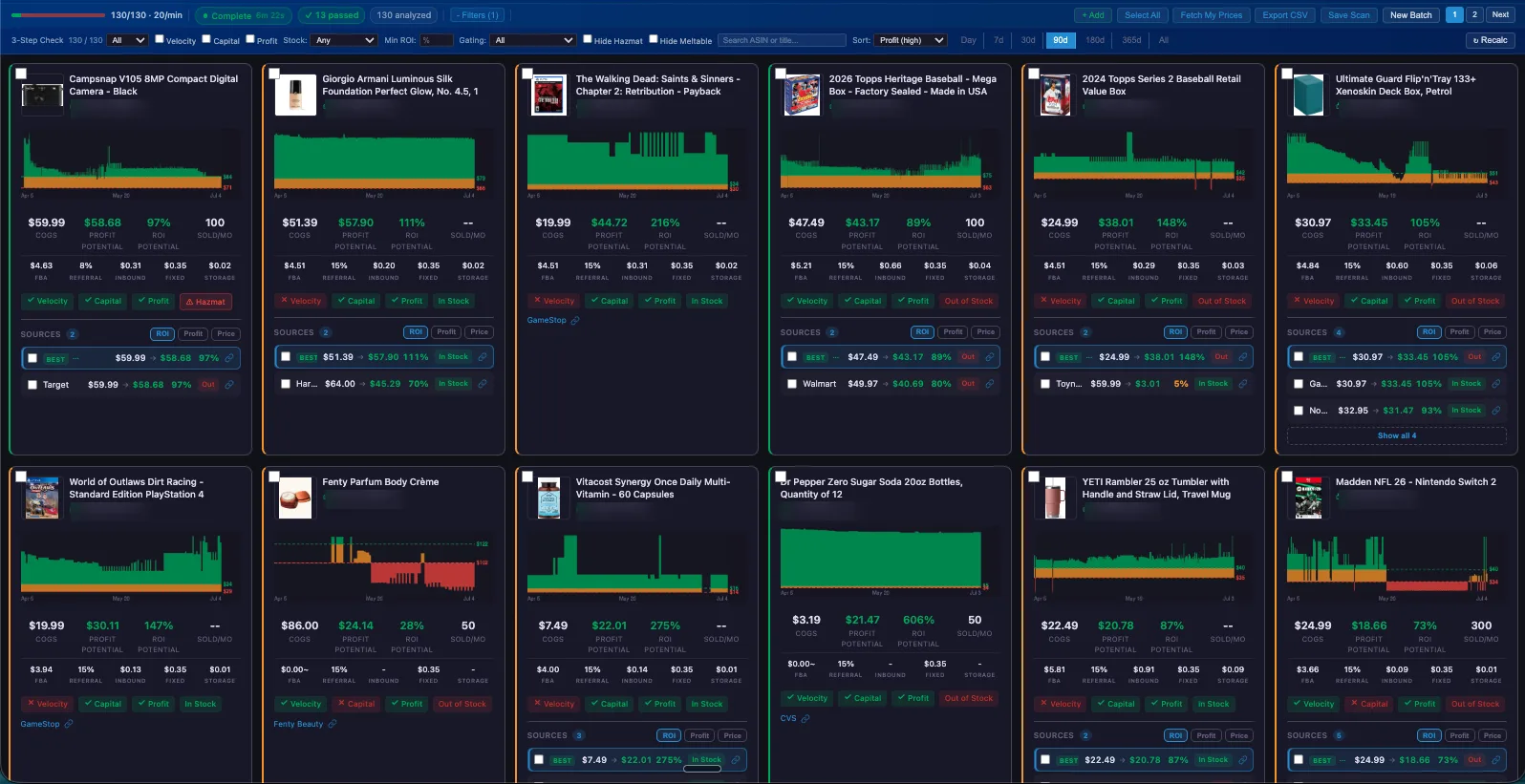
Would this product have paid you?
See your profit zones on every Amazon listing.
Profit Zones paints Amazon's price history in red, amber and green against your own break-even, then shows what actually moved at each price. Open a listing, know in seconds.
Free to install. A Keepa API key is needed.
The problem
Price history tells you what happened. It doesn't tell you if it paid.
You open a listing, see a price chart, and start doing math: fees, shipping to Amazon, prep, your cost. Then you do it again at a different price. A calculator gives you one answer for today's price, and today's price is one point. What you want to know is how often this product has been at a price that pays you, and whether anything actually sold there.
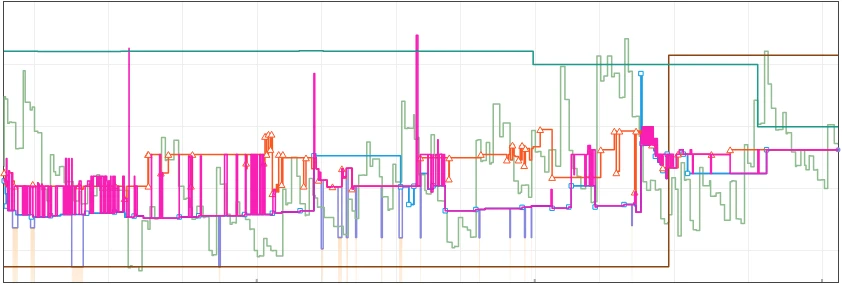
Keepa's data is the best in the business, but its chart looks like somebody sneezed on a spreadsheet.
How the zones work
Three colors. One question.
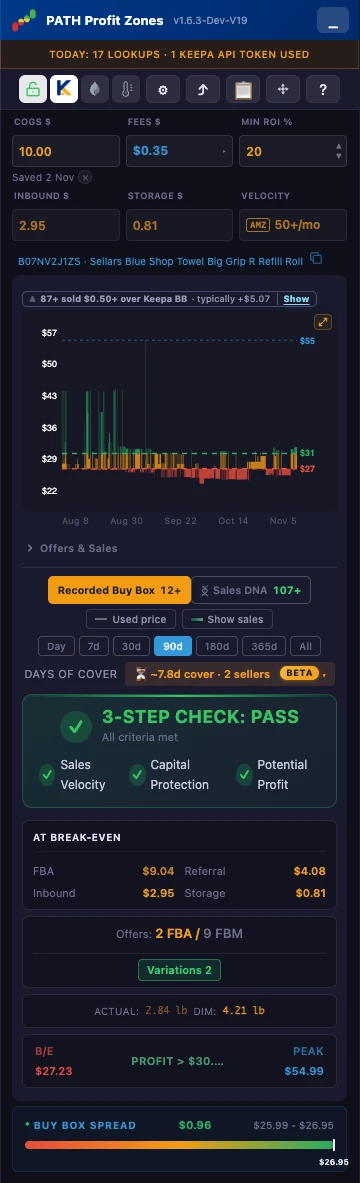
Enter your cost once. Profit Zones adds Amazon's fees, inbound shipping and your own fees, then draws the price history in three bands.
- Red is below your break-even.
- Amber is between break-even and your target.
- Green is at or above your target.
Your target can be ROI, margin, a dollar amount, or ROI and dollars together. A 3-Step Check above the chart passes or fails velocity, capital protection and potential profit, using your settings.
Sales DNA
The price where units moved.
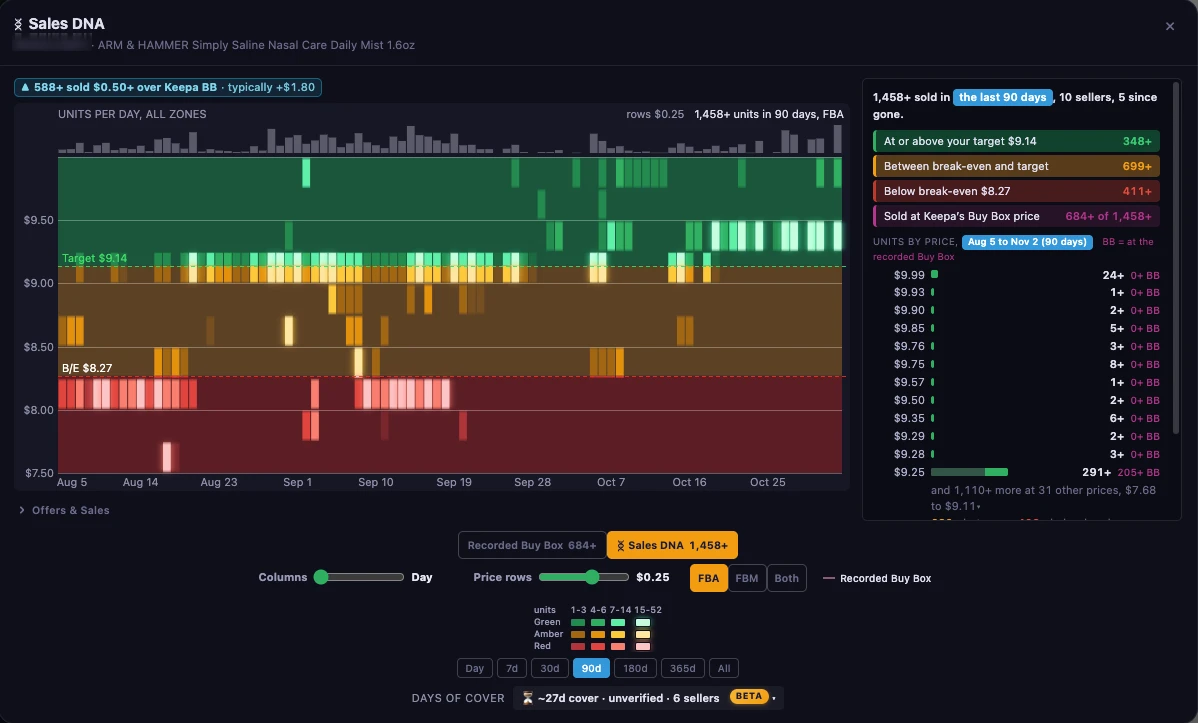
Keepa keeps a stock record for every seller on a listing, including sellers who have since left. Sales DNA reads those records, treats each drop as units that moved, and prices each one at what that seller charged at that moment. Then it lays the result against your zones.
Every number is a floor, written as 59+, because stock records can miss movement and Profit Zones won't guess upward. It's evidence of sales at a price. You make the call.
Free for a limited time
Free for a limited time. Get it while it's free. Once it goes Premium, free users get a locked preview.


“[Profit Zones] makes it so easy to see if an ASIN is profitable. I can make a sourcing decision in seconds!”
Variation Confidence Free
Which child of a variation family is worth buying?
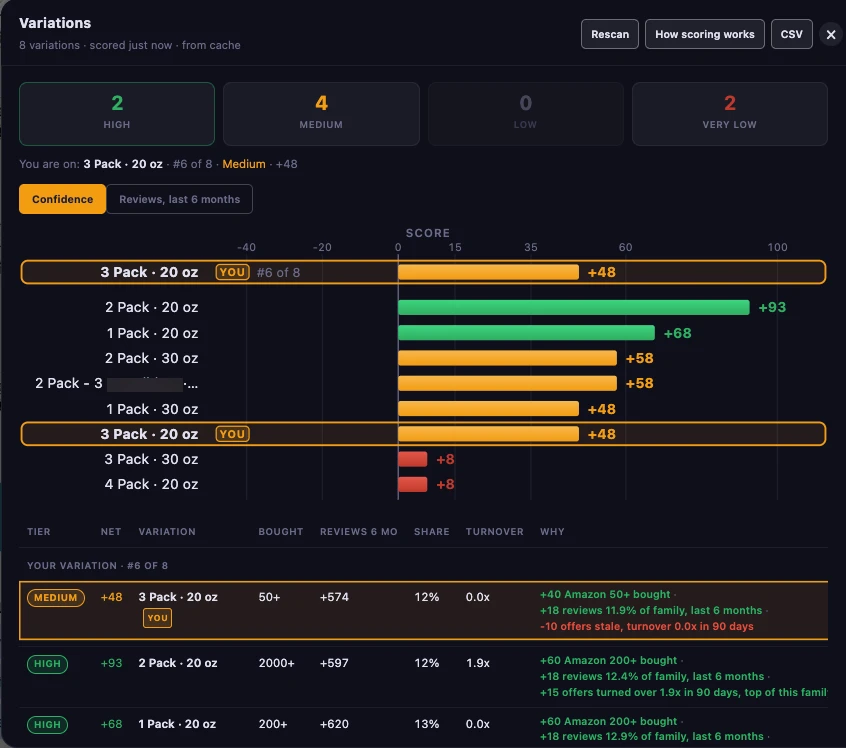
A parent listing can hold dozens of variations, and most are dormant. Variation Confidence scores each child out of 100 on its own signals: Amazon's bought badge, its share of the family's recent reviews, and offer turnover. The whole family reads on one table, in tiers from High to Very Low.
The scoring rules are published in full. It asks before it spends any Keepa tokens: one per variation that isn't cached, two with review history on.
Bulk Analyzer Premium
Score a whole list, not one page at a time.
Upload a list of ASINs and Bulk returns a zone read, Sales DNA and approval status for each. By default it works from Keepa's data in your browser, so it uses no Keepa API tokens. There is no cap on list size, and a typical run is around 600 ASINs an hour.
Finished scans save automatically, so a long list is never lost.
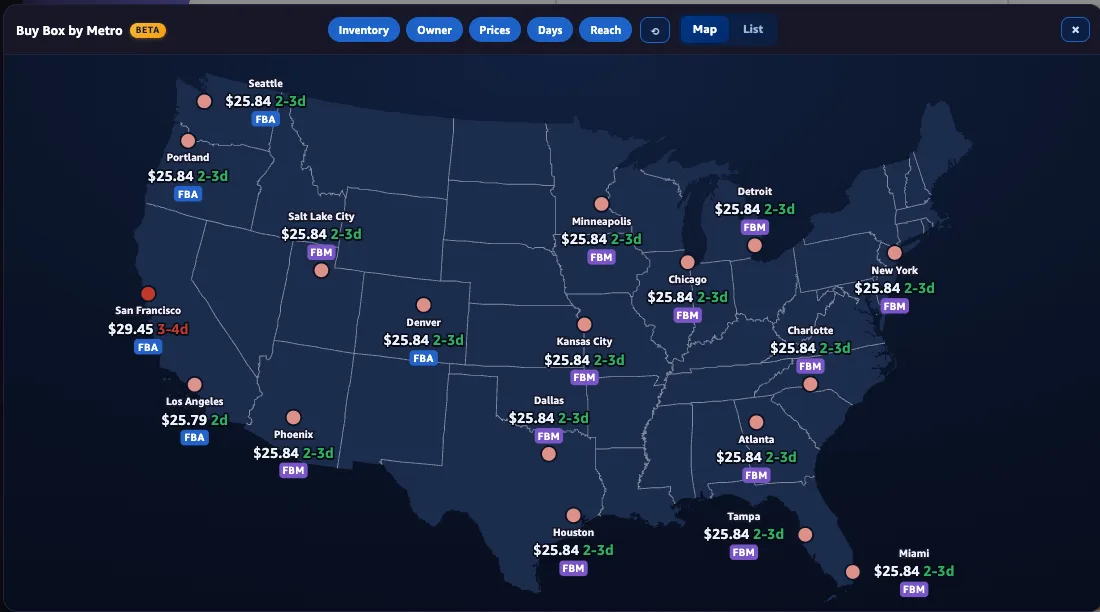
Buy Box by Metro Premium US only
Keepa's Buy Box is one reading from one place.
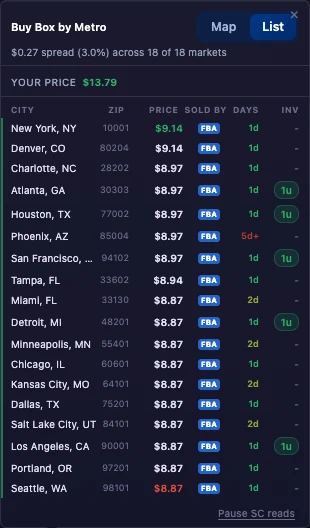
Amazon can show shoppers in different cities a different Buy Box price. Buy Box by Metro checks the price in up to 18 US metro markets and shows the spread, a list by city, and a map (Beta) colored by your own zones at each metro's price.
See where the price runs high and where it doesn't before you send inventory in.
Seller Central
See your own side of the product, in the same panel.
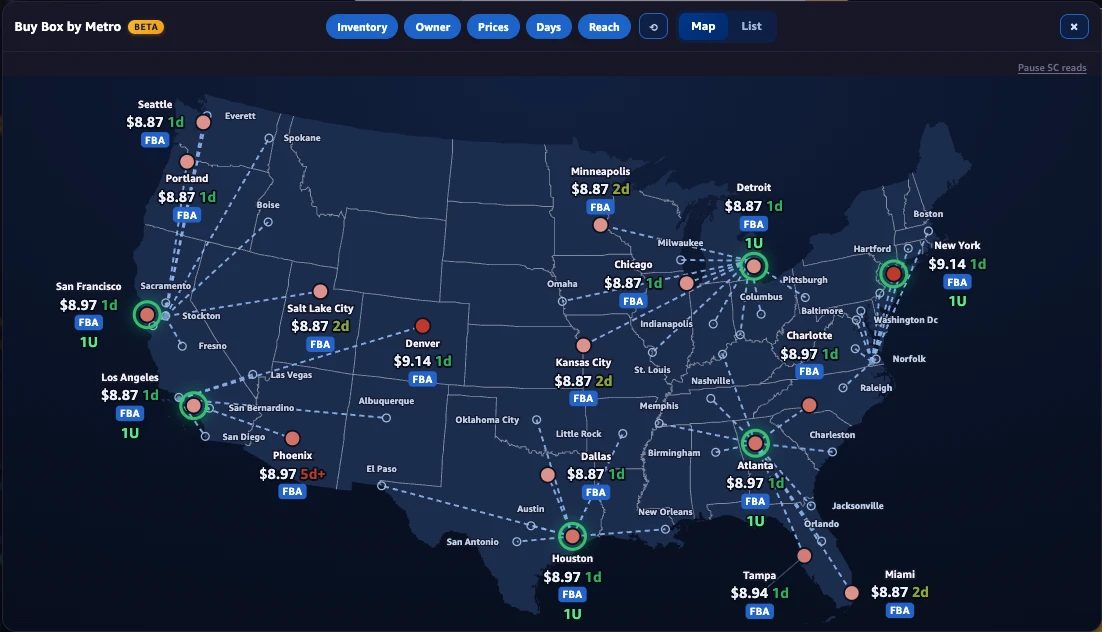
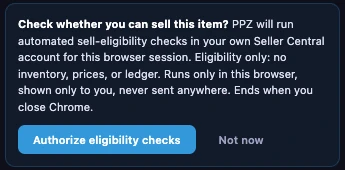
With one click, Profit Zones reads your Seller Central session to show whether you're approved to sell the item, which fulfillment centers hold your FBA units, what's in transit, and your own price.
Your units show up right on Buy Box by Metro. A green ring marks each market your inventory is closest to. That's the nearest metro, not necessarily the exact city where your units sit.
It asks first, for this browser session only. The approval check is free. Inventory, in transit and Your Price are Premium.
“Everyone says ‘do the work,’ but that’s tough when you’re flooded with open-ended decision points every time you sit down. Now I build my system, trust it, and push the go button. 3 greens? Buy. No 3 greens? Move on. Pure execution.”
The small things
The details that add up over a thousand listings.
COGS memory Free
Profit Zones remembers your cost on every product you've priced, so a second visit fills it in.
Custom fee library Free
Save your own fees once (prep, labels, bundling) and reuse them on any listing.
Q4 and bulky-tier fees Free
Fee math includes Amazon's Q4 peak and fuel surcharges and names the size tier, bulky tiers included.
Sales tax and VAT Free
Add sales tax to your cost, or work on VAT-exclusive prices if you're VAT registered.
Offer Spike Free
Flags a sudden jump in sellers against the last 90 days.
Hidden Seller Free
On grocery listings, flags sales the visible sellers can't explain.
Box Filler Free
Spots small, light units that ride along in a box and spread your inbound freight.
Buy Box Winner History Premium
Who has held Keepa's Buy Box over 90 days, and for how long.
Bulk auto-save Premium
Every finished Bulk scan saves itself as a file you can reopen later.
Days of Cover (Beta) Premium
Roughly how many days of stock are left on the listing at the recent sales rate.
Offers Table Premium
Every live offer Keepa knows, with price, stock reading and units moved over 30 and 90 days.
FBA inventory export Premium
Download your FBA inventory as a CSV.
Trust
Built to be inspected.
Your costs, settings and per-product cost memory stay in your browser. Seller Central is read only after you authorize it. Shared images can hide the title, the ASIN and your price.
We publish how the access works, what leaves your browser, and the rules behind every score. Read how Profit Zones accesses your data, the privacy policy and the research papers before you install anything, including us.
The panel works on Amazon US, Canada, UK, Germany, France, Japan, Italy, Spain, India and Mexico. Buy Box by Metro and FBA inventory are US only.
Built by Amazon sellers.

Keepa
Price history comes in from Keepa's cache on your device first. Your own API key is used only as a fallback, or for a step you approve.
Amazon Seller Central
Your approval status, inventory and price, read with your own session. Read only, and only after you click Allow.
Your browser
- Your costs, fees and settings
- Cost memory for every product
- Your Seller Central data
- Sales DNA and every score, worked out here
None of this is sent to us.
Our license server Premium only
Your license key, a device ID and the ASIN you're viewing, to confirm your Premium subscription and warm Buy Box by Metro prices. Free users send nothing.
Sellers using it
What sellers say.
“It adds a missing piece to the system. Quick and effective assessment of ASINs’ profitability, today and historically. I love it.”
“A color-coded quick look eval of go/no-go on profit protection and profit potential. This really speeds up confirmation of purchasing for test. Fantastic.”
“I check every lead with Profit Zones. It’s usually my final check before I hit buy.”
“An indispensable part of how I evaluate leads. I wish I’d had it when I started selling on Amazon.”
Questions
Before you install
Do I need Keepa?
Yes. A Keepa API key is needed. Day to day, Profit Zones reads the Keepa data your browser already has first, so most pages spend no tokens. The key is the fallback.
Bulk and Variation Confidence both ask before they spend any tokens. We are not affiliated with Keepa.
Which Amazon marketplaces does it work on?
The panel and chart work on Amazon US, Canada, UK, Germany, France, Japan, Italy, Spain, India and Mexico. Buy Box by Metro and your FBA inventory are US only.
How accurate is Sales DNA?
It's an estimate built from drops in sellers' stock between Keepa's readings. Not every change is recorded, so every count is a floor (59+). Treat it as evidence to investigate, for example with a test buy priced where units moved.
Does Profit Zones log into my Seller Central account?
It uses the session you're already signed in to, only after you click to authorize it, and only for that browser session. It reads, and it never changes anything in your account. Every request carries an Agent tag with our name, as Amazon's agent policy requires.
What does Profit Zones send to its servers?
License checks, Buy Box by Metro lookups, and a few anonymous banner events. For Premium users, each product page view sends the ASIN and public product metadata, tied to your license key, to pre-warm the price-spread cache. A report you choose to send yourself goes too.
Your costs and settings stay in your browser, and so does what Profit Zones reads from Seller Central. The full list is on how we access your data.
Can my VA or team use it?
Yes. Each Chrome profile that turns on Premium uses one seat, and a license covers 2 Chrome profiles. Need more for a VA or a partner? Ask us at support at profitzones dot app.
Is it free?
Profit Zones is free to install, and the zones, the 3-Step Check, the approval check and Variation Confidence are on the free plan. Sales DNA is free for a limited time. Premium adds your Seller Central inventory, Bulk and Buy Box by Metro. Plans and features can change.

Open a listing. See your zones.
Every product that never paid you is a twenty on fire. Add Profit Zones to Chrome, enter your cost once, and every Amazon product page shows you what it would have paid.